Home › What's in the box
What's in the box
Everything you need to turn the TV you already have into a digital menu board. It arrives set up and ready, so there's nothing to install.
-
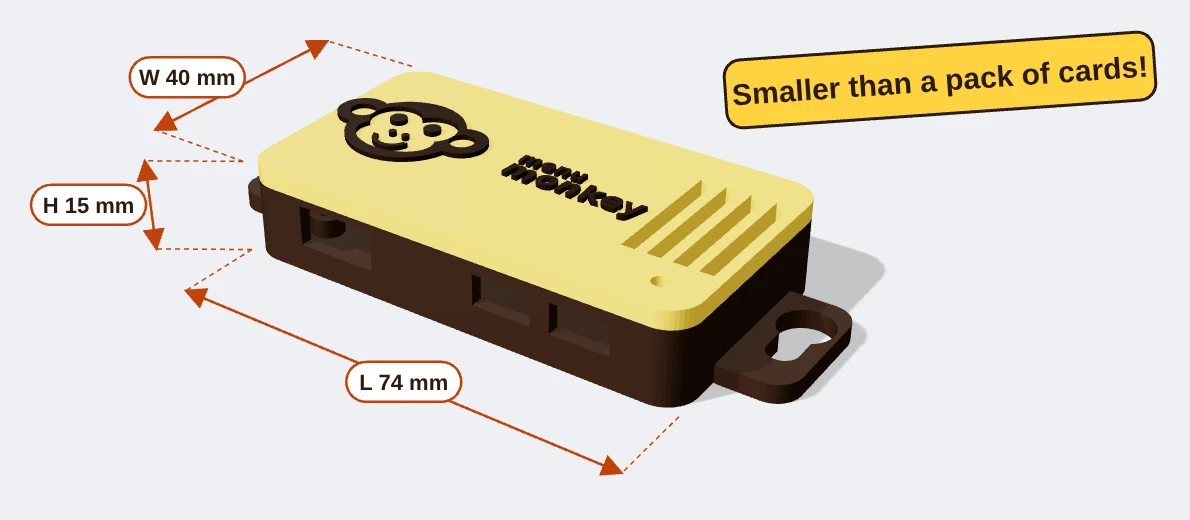
The Menu Monkey box
The clever bit. A tiny computer in our own monkey case, smaller than a pack of cards at just 74 × 40 × 15 mm. It sits behind your TV and shows your menu, specials and ads all day.
- Comes ready set up for you
- Wi-Fi built in
- Hang it on its keyhole slots, stick it on with the Velcro strips, or just pop it on a shelf
-
HDMI cable
Connects the box to your TV's HDMI socket. One end is small to fit the box, the other is the normal size every TV takes.
-
Plug adapter with USB
The handy bit. It goes in the wall socket your TV already uses. Your TV plugs into the front of it, and the box takes its power from the USB port. No spare socket needed.
-
USB power lead
Runs from the adapter's USB port to the box. Long enough to reach from the socket to the back of the TV.
-
Velcro strips
Another way to fix the box. Stick one half on the box and the other on the back of the TV, a wall or a shelf, then press it into place. Easy to pull off again if you move things around.
How it all plugs in
Four connections and you're done. Most people have it running in under five minutes.
- Adapter into the wallUnplug your TV and put the plug adapter in that socket.
- TV into the adapterPlug your TV back in, into the front of the adapter.
- Power to the boxUSB lead from the adapter to the Menu Monkey box.
- Box to the TVHDMI cable from the box to a spare HDMI socket on the TV. Switch the TV to that input and follow the screen.
What you'll need
A TV with HDMI
Any size, any make. It doesn't need to be a smart TV.
Your café Wi-Fi
The box joins it once during setup. If the Wi-Fi drops, the screen keeps showing your last menu.
A phone or computer
To type your menu and make changes. Nothing to download.
Questions
Does my TV need to be a smart TV?
No. Any TV with an HDMI socket works. The Menu Monkey box does all the clever bits.
Do I need a spare plug socket?
No. The plug adapter goes in the socket your TV already uses. The TV plugs into the adapter and the box takes its power from the adapter's USB port.
What else do I need?
Your café Wi-Fi and a phone or computer to type your menu. That's it.
How do I fix the box in place?
Whatever suits you. Use the Velcro strips to stick it to the back of the TV, a wall or a shelf, hang it on two screws using its keyhole slots, or simply sit it somewhere out of sight.
What happens if the Wi-Fi drops?
The screen keeps showing your last menu and catches up as soon as the Wi-Fi is back.
Want one for your café?
£4.99 a month for your whole café, however many screens.
Register your interest